
From a Mulebuy Spreadsheet card to your door, one handover at a time
The six official Mulebuy stages, with the right place for an item remark, a warehouse question and a parcel instruction.
Before following the six screens
This walkthrough follows Mulebuy’s official buying-guide sequence, illustrated with its desktop and mobile demonstration screens from 2026. The current account determines available actions, fees and deadlines. Our October 2026 public-site check did not establish that ordering was available; it does not establish the state of an individual account.
Prepare the seller URL, exact option, quantity, measurements and a budget that includes international shipping. The catalogue helps you find and compare; Mulebuy’s own account handles purchase, warehouse services and parcels. If you choose a different agent, use that agent’s instructions rather than transferring Mulebuy’s button names or terms.
Draft a precise remark → · Read the received-item evidence · Find help by order stage
1. Search for the product
The homepage search field accepts a marketplace product link or keywords. The camera icon is the image-search entry. For an exact find, keep the seller URL; a visually similar search result can belong to a different shop or option.
In the illustrated screen, paste the seller link into Enter Product Link Or Keyword and use Search. Image search starts from the camera icon. Check the result against the original listing before continuing.
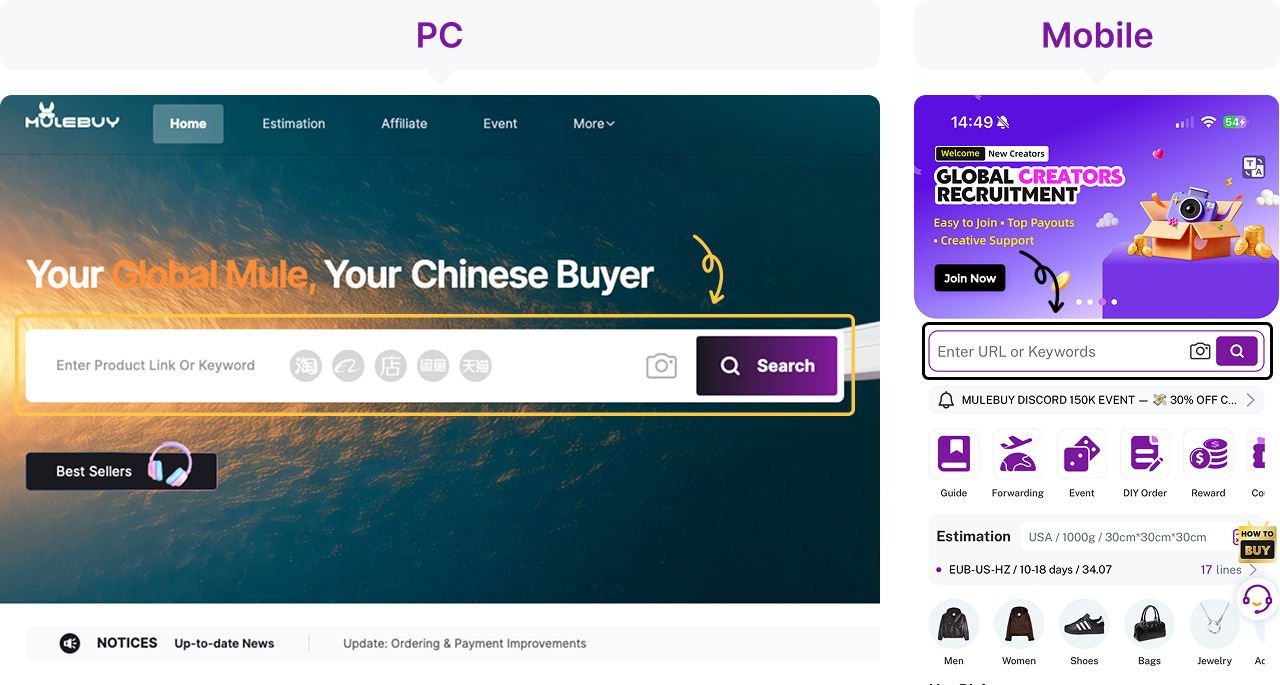
Open the exact listing before drafting a remark. Copy the seller’s option wording instead of describing the colour from memory.
2. Choose the option, then complete item payment
Open the product and choose the exact colour, size and quantity. Read the price for that selection, the seller’s domestic postage and any separate checkout charge. The international parcel is a later transaction.
The official example shows Color, Size, Quantity and Note on desktop, and Add To Cart on mobile. Adding to the cart is not payment. Continue through checkout, confirm the requested information and keep the payment record. Ask about missing specifications before authorising a purchase.
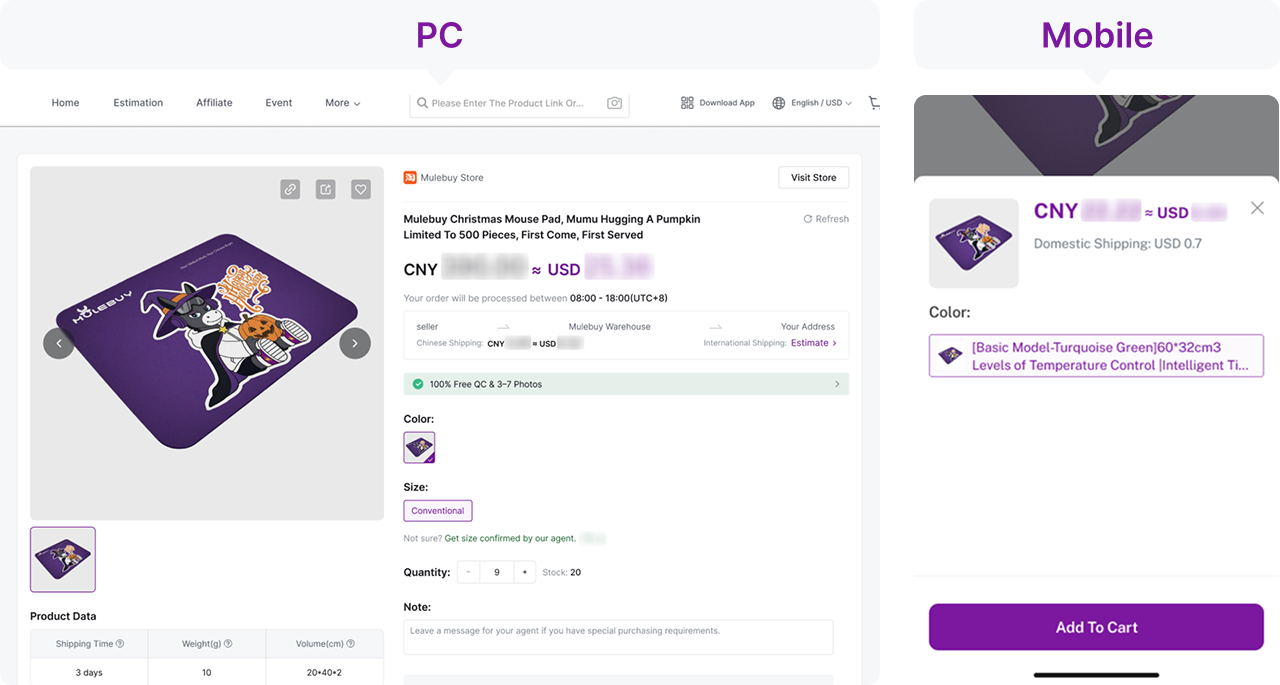
Put one actionable request on each line. A pre-purchase measurement question and a later warehouse photo request are different tasks; a note alone does not purchase a paid service.
3. Follow purchase and domestic transit in Orders
After submission, distinguish payment from purchase, and purchase from the seller’s dispatch. An order may still need a price, stock or option decision. A receipt alone does not confirm that the seller has sent anything.
Use Orders and the relevant order’s Details. The demonstration includes Payment Needed, Reply Needed and Order Pending. Read the status and any message together. Keep the domestic tracking number if one is provided; there is no universal number of days for this leg.
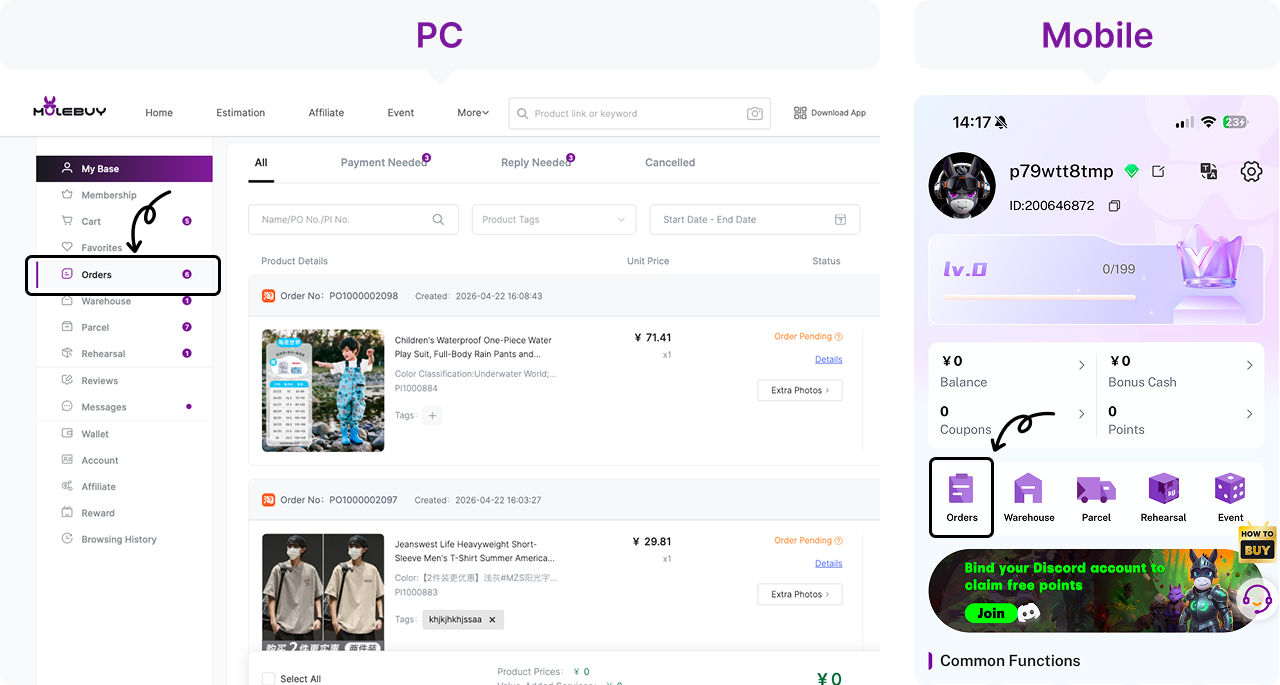
Read the actual response. Silence does not confirm that a remark was accepted, a seller answered or a purchase went ahead. Ask for confirmation if the status does not resolve your question.
4. Open Warehouse and inspect the received-item photos
Arrival, inspection and availability for parcel submission are separate events. In the official buying sequence, warehouse inspection follows domestic delivery. Check each received item against the paid option and quantity before selecting it for international shipping.
Open Warehouse, find the order and open its QC Photos thumbnail. Check the whole item, the option label and the relevant detail. If a dimension is missing, ask for a specific tape-photo view and confirm any extra charge. Visible photos do not certify authenticity, material composition or electronic function.
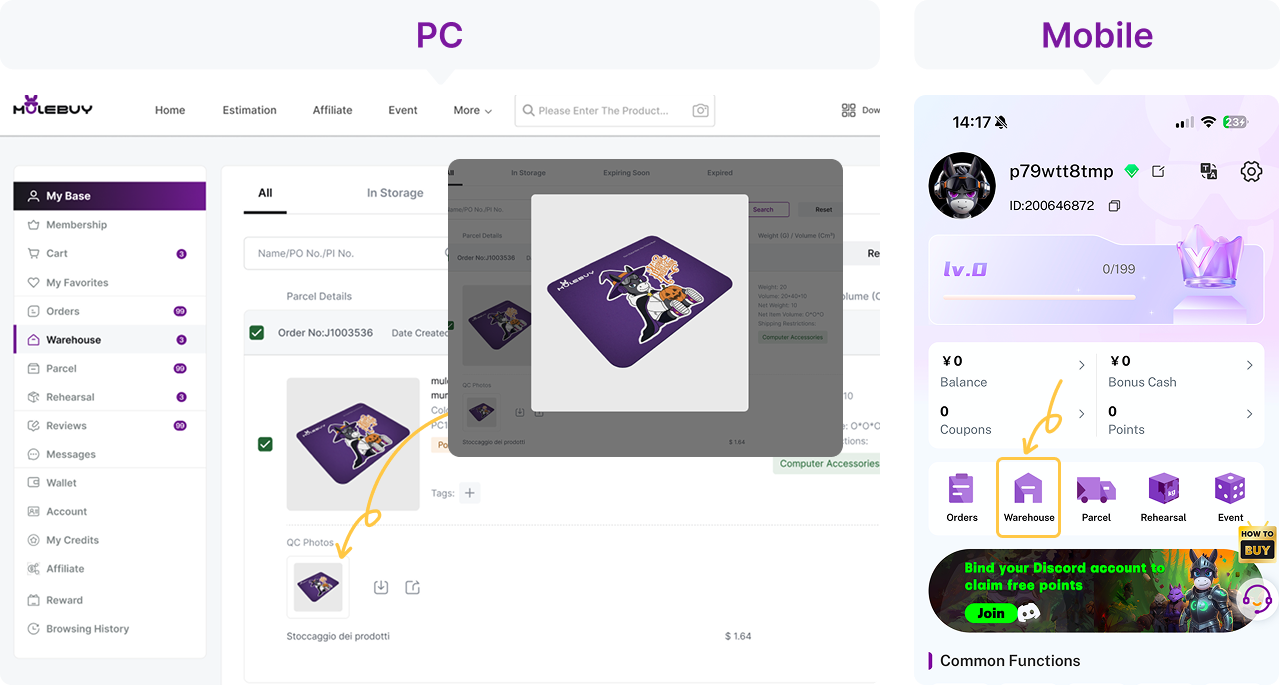
Match the report to the remark. If you requested a flat waist photo and received only a size label, the measurement remains unanswered. Ask before the applicable return deadline.
5. Select accepted items and submit the parcel
Choose only items whose questions have been resolved. Confirm the destination, packing choices and a line that accepts the contents. Keep unresolved items separate and check their storage deadlines; a long free-storage period does not extend a seller’s return window.
The guide text calls the warehouse actions Pre-calculate or Submit; this illustration labels the desktop alternative Rehearsal Packing and highlights Submit. Follow the label in your account. Review the estimate and optional services before confirming. Final size and weight can change the shipping charge, requiring a payment or refund of the difference.
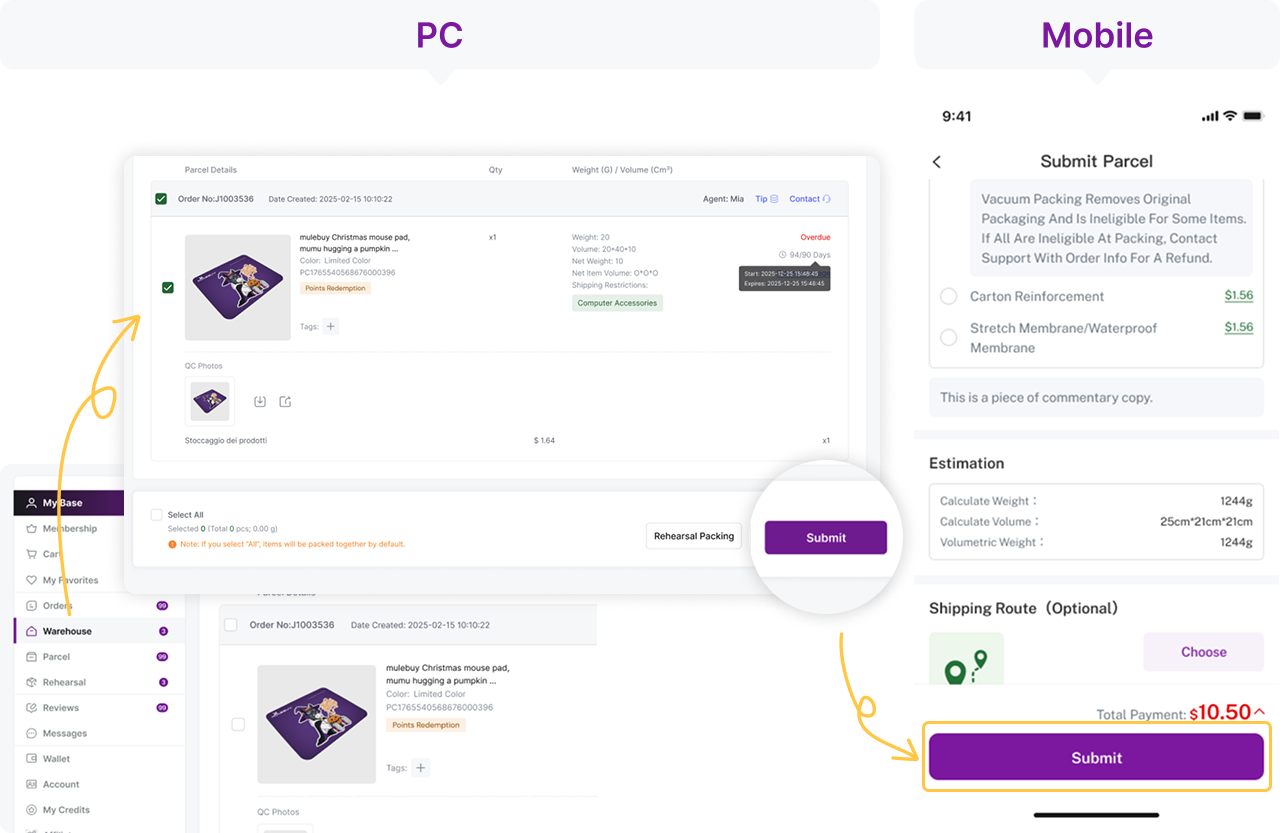
Parcel instructions belong to the parcel request. “Keep the shoe box” and “remove outer courier packaging” refer to different layers; specify the one you mean and check any packing charge.
6. Track the parcel and keep the delivery record
The official guide ends with parcel tracking. Keep the parcel ID distinct from the individual order IDs, because several orders can share one parcel. A parcel record or tracking number is not itself proof of carrier handover or delivery.
Open Parcel (called Parcels in the guide text) and Details for that shipment. Read its current status and tracking scans. At delivery, preserve the label, packaging and a clear record of the contents. For a mismatch, contact the agent through the channel attached to the order and supply the item and parcel references.
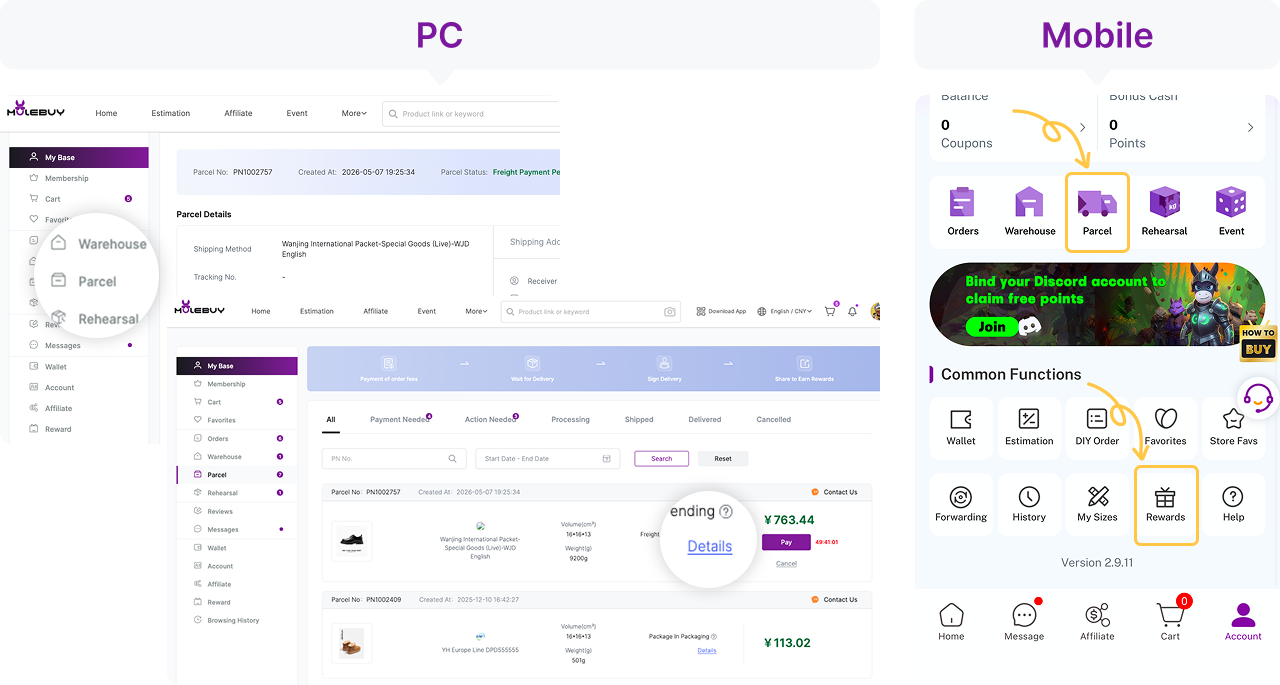
Compare what arrived with the saved remark and warehouse report. Preserve both the original request and the agent’s response; a new description written after delivery does not document what was ordered.
What a useful remark asks, and what it cannot approve
For jeans, “Please send the right size” gives the buyer very little to check. A more useful request is: “Option: light wash, size 32. Before purchase, please confirm the seller’s flat waist and inseam for this option. After arrival, please quote the fee for a clear tape photo if standard photos do not show these measurements.”
The first part asks for information before money reaches the seller; the second requests a warehouse service only if it is needed. Neither sentence changes the seller’s stock, return conditions or measurement method. Do not assume that a free-text remark has purchased a paid inspection.
- Keep the exact option text and size chart with the generated remark.
- Read the buyer’s response and the order status. Silence is not acceptance and a balance deduction is not dispatch.
- If a requested measurement would cost extra, confirm the price before authorising it.
- At QC, compare the actual report with the question. If the tape or label is missing, the question is still open.
Use the remark writer as a draft, then remove requests that do not apply to the product. A short request with a measurable outcome is easier to act on than a paragraph of general quality demands.